Tuesday, February 18, 2025

Places that would Make Great Zelda Dungeons

If you've ever played Zelda, then you know that the dungeons are always in the most obscure yet cool places. Whether it's inside a waterfall, inside a fish's mouth, in a grave stone, or even inside a giant egg, the locations are always very interesting. For me, they always got me thinking of real life, and what-if scenarios of these dungeons being in real life places. The mystery and scale of Zelda dungeons are massive, so putting these dungeons into real life places with the same sort of qualities sounds kinda cool. 

With that, let's make a list of places I can think of that would make cool dungeons.


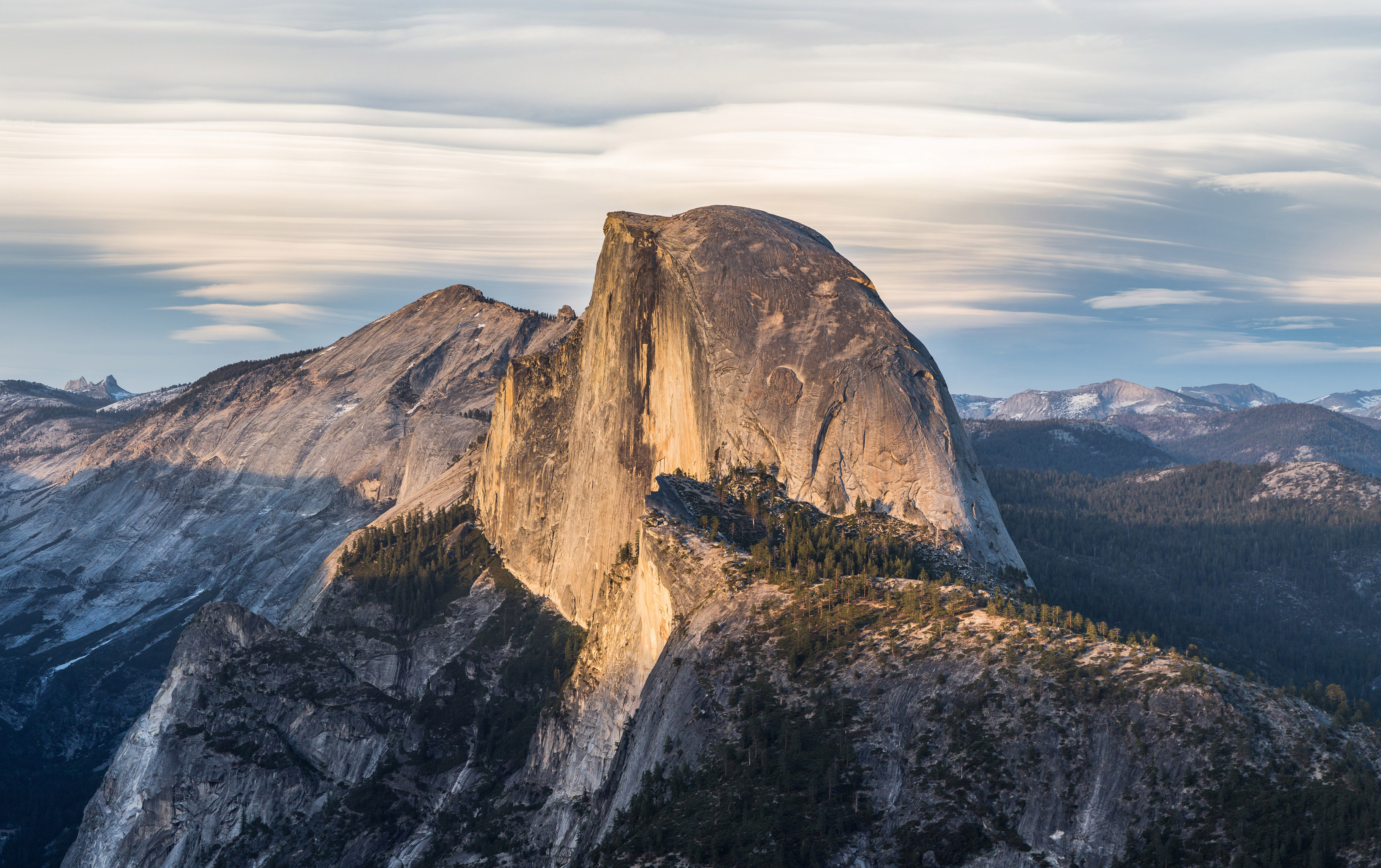
1) Half Dome

Half Dome - Wikipedia 

If you don't know this is a mountain in Yosemite Valley. It is the icon of this national park, and also a cool (theoretical) place for a Zelda dungeon. Imagine a giant carved doorway leading to ominous steps down a dark path into the base of the mountain. Since it's super tall, this dungeon could go underground and also multiple stories high. That's assuming the mountain is hollow. It's not, so...

 2) Hollywood Sign

Hollywood Sign - Wikipedia 

Yeah, like inside that big H. I know you're not technically allowed to hike in front of the sign, but if this wasn't reality, Link would have the excuse to break the rules. I always felt that this landmark would be a cool place that Link would enter. The big H would have a doorway that would be lead to another random dimension.

3)  Hearst Castle

Hearst Castle - From Above with Aerial Photography | West Coast Aerial  Photography, Inc

When I visited this for a quick tour, I never expected that this insane feat could be on a hill, but oh boy. The Neptune Pool, while essentially taunting me (you can't get in unless you're like a Hearst family member or part of a super expensive club), is absolutely beautiful. This entire castle, if it wasn't a historical landmark (again, think non-reality), would be a great Zelda dungeon. There are so many rooms to explore, and even the trek up that hill reminds me of Zelda. The massive climb up a hill to reach a dungeon at the top. Totally Mt. Crenal Minish Cap.


That's all I can come up with for now. Let me know of any more.

Monday, February 17, 2025

My Favorite Mug

Whenever it's the weekend, I'm finished with my homework, and I'm feeling refreshed after a good night's sleep, I feel it's the perfect time to record a video. I sit at my desk, turn on my computer, and exhale a quiet sigh of relief--it's finally the weekend. I typically record shorter, easier to finish videos, like a Yoshi's Island part. If I'm working on a video that takes more time and effort, I skip the recording and work on those instead.
    Each time I do this, I have my favorite In-N-Out mug--filled with half a cup of black coffee--right beside my keyboard. I got it as a gift years ago, and it's been the only mug that I've used since. The In-N-Out mug is a cylindrical shaped mug (meaning no odd shapes) with the drink cup design over it. It's simple, yet it looks good. Unfortunately, I couldn't find any pictures of it online because they stopped making the exact one I have. The latest ones are red inside and are slightly taller, which I don't like as much. I prefer the white inside and appreciate how the margins for the design are pretty large. Thankfully, I can take a picture of my personal one and show you.


I removed the background of this one, but here it is. As you can see from the coffee stains, I'm using it right now as I write this. They've released a few vintage cups that resemble this design, but I still prefer this one. Maybe I'm biased--I've had this cup for years--but to me it looks the best (although I will say the burger one looks cool). 
    As for the coffee, I enjoy the McafĂ© medium roast. I'm no coffee expert--and I don't drink it often enough to pretend that I am--but honestly, the Mcdonald's one isn't bad. Whether you grab it at the actual place or just make it yourself at home, it'll do the job. 
    I like Starbucks, don't get me wrong. I just feel like Starbucks is meant for other types of coffee and drinks. I never get mochas, lattes, or cappuccinos. I hate the taste of milk in my coffee, so I drink it black. All those other types of coffees have significant amounts of milk, creamer, sugars, etc. in them that I don't care for. Call me an old white man, but I love it either black or with half a drop of milk. Whenever I go to Starbucks, I get the Pike Place roast. 
    This In-N-Out mug is always my go-to mug, and it hits especially hard on a Saturday morning when I'm ready to film a video. Am I slightly addicted to the coffee? Maybe. Is it worth it for that little boost and taste? Yeah.  

Sunday, February 16, 2025

Headphones and Mics

    Basically since I started posting videos with commentary, I've used the same 3 microphones and headsets for nearly every video. They're still on my desk today, and I still haven't gone out and bought new ones. If you watch some of my videos with commentary, you'll notice that I switch up the microphones a lot. In my older videos, I often used this headset and mic: 

 
    I didn't have that extra peripheral that gave it volume controls, it was just the headset and the 3.5 jack. I got it randomly as a freebie and decided to keep it to see if it would be good for making videos. In all honesty, it's okay. The audio from the headset isn't bad, but the microphone is pretty horrible. If you ever hear a really sensitive, sibilant heavy microphone that has like no bass, then this is the one I'm using. It is distinct sounding, so you'll know right away. I've tried a lot of methods to de-ess this mic in post editing, but I've never had much luck in fully getting rid of those annoying hisses and ear-piercing "s" sounds. Sorry for your ears if you've watched a video with this; I'm probably not going to use it anymore.        The other mic I used to always use was the given one from this headset:
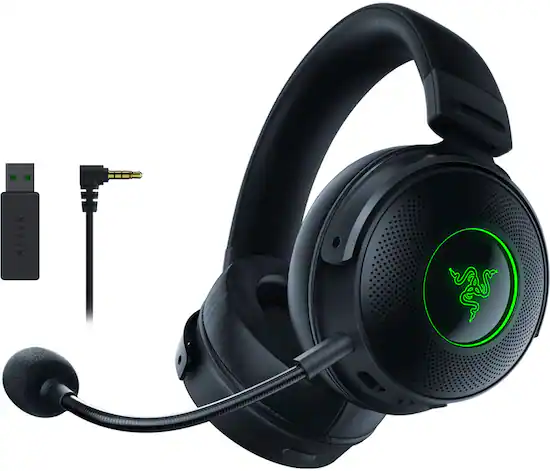
The image features a black and green Razer headset, which is a gaming headset. The headset is shown in various angles, including a close-up view. The headset is accompanied by a microphone and a USB adapter, which are essential for gaming and communication purposes. The headset is designed to provide an immersive gaming experience and enhance audio quality during gameplay.
    This is the Razen Kraken V3 Pro. It's significantly more expensive and higher quality than the other one (obviously). This has bluetooth and an auxiliary cable for regular wired use. I almost never used it in the bluetooth mode, since the battery life was pretty shitty. I guess it's because the speakers were decent and because the headset had lights and vibrations. To me, it's completely unnecessary. I guess if you're intensely gaming, but I don't do that, so... When I did use it in the wired mode, the sound was pretty damn good. I used that microphone pictured to record a lot of videos as well. This one has a more bass, sounds higher quality, and even sort of removes background noise. It is way easier on the ears. I lost that pop filter/windscreen a while ago, which sucks, because now it is sensitive to any blowing sounds.
The last--and my favorite--mic is this:
Apple EarPods Headphones with 3.5mm Plug, Wired Ear Buds with Built-in Remote to Control Music, Phone Calls, and Volume
Yup, the Apple Earpods. These things are probably my favorite wired earphones ever. I mean, they're just so damn iconic. They've been out for forever, sound great, and have a microphone with volume controls. I use these more than my AirPods when I listen to music on my Mac or my phone. They're that good. I know that there are more expensive and better quality wired earphones out there, but I don't really care. These are all I need. I've used them in countless videos as well. The microphone is not bad, either. They're about 100x better than AirPod mics. They have a slight bit of background noise to them and they're not the loudest things ever, but it works pretty well for videos. The fact that they're so cheap means I don't have to worry about if they break. These are honestly the perfect gift for anybody who needs headphones or wants a backup pair to just throw in their bag. 
    With all that said, I still don't put enough effort/care enough to make my mics sound super professional and crisp. Even if I bought an expensive one (which I just don't wanna do), it would still probably sound like crap. Plus, I like it when the mic comes with the headphones, since I don't have to set up another peripheral in the video. It's quicker to plug in the headset and start recording. Sadly, the Mac mini doesn't have any internal microphone, since I'd probably use that too. 
Let me know which mic is the best in your opinion.

Tuesday, February 11, 2025

Chrome Capabilities

 This was another journal I pulled from my computer files (it was originally a txt file):
 

    I was getting frustrated at my school Chromebook today because of what I mentioned yesterday about the search feature. This time though, I noticed a bunch of OTHER issues that I didn't even talk about. In addition to it being on the left side, the search key is actually super laggy and takes like a full second for the search panel to appear. I have two possible theories as to why this happens:
        1) The Chromebook is just slow and takes time to display that menu
        2) They intentionally programmed it to not immediately appear because there are keyboard shortcuts that involve the search key. If it appeared instantly, it might cause issues with those shortcuts.
    Either way, as someone who actually uses the search feature on any computer (Mac and Linux), it is incredibly annoying to have to wait a second for the window
to appear, and then type in your query. If you don't wait and immediately start typing, the window won't open and nothing will happen.
    Another annoying thing has to do with what actually appears when you search something. Since it searches through your files and frequently visited websites, it's possible that two seperate things with similar/the same name can appear at the same time. If the one you actually want isn't the first option, you have to move you hand off the keyboard and use the arrow keys to tab down or click on it with your trackpad. This is a tremendous waste of time and feels so tedious, almost as if it was pointless to even use the search feature in the first place. In my case, I wanted to search for "Chrome" to quickly open the browser, but instead my document "ChromeOS tips" kept appearing before it. The more annoying part is that sometimes Google Chrome would have priority, and sometimes the doc would. I don't understand why it couldn't just pick one and be consistent. Or better yet, have any app that you search for have priority. If you want to have the file/other thing appear first (in this case, my doc), then make it so that if you further specify in your search, it appears. Example:

 - I search "chrome", and the browser opens
 - I search "chromeOS t" and the doc appears

    I don't know what it is, but MacOS and KDE got their search system down to a tea. It feels so good and accurate to search for anything on my Mac. ChromeOS has a long way to go.
    Besides yapping about the search tool for the entire time, let's talk about other "Chrome Capabilities". Google Classroom. The weirdest web app ever.
    On its surface, it may not seem that weird to you. It's just an app mostly for schools that let's teachers post work, announcements, or resources to their students digitally. It's also free. However, you don't need to be in a school to use it, and you obviously don't need to be a teacher either. Sure, some features are gone if you're not using a school account, but who cares. To me, it could become like a subreddit. You have a subject (the r/), and if you let your students (members) post, they can pretty much post whatever they like. The teachers of the class will be the mods. I'm not sure if Google moderates or watches over what is posted on Google Classrooms, and I know it won't be school related at all. Either way, it's interesting to me how a Google Classroom class code link could be distributed and essentially become it's own social media page for whatever you want. I've seen some online were people post memes or other stuff like that. The only issue I think is with the class size, as with a personal account you're limited to 250 people per class. With a G Suite account (not free) you can have like 1000, which to me is insane.


Monday, February 10, 2025

Welcome to KWrite

    Here is a random text file I saved on my computer. I wrote it using an editor on Arch Linux, but decided to post it here on my blog. I apologize if the language is a little more harsh:


    Yeah, shocker. This is the first entry I'm not writing on Google Docs or TextEdit, and that's because I wanted to try KWrite. KWrite is KDE Plasma's default text editor. Although simple, it's actually pretty solid and even has that sweet, sexy syntax highlighting. KDE Plasma is the desktop environment I chose to run Arch Linux on. As I begin to use Arch Linux more and more, I am beginning to discover more and more things I love about it. First off, KRunner. This is KDE's Spotlight search, but dare I say it's a bit better...? Maybe it's the fact that you can customize it within the system settings. You're even able to add specific websites that it searches within to make searching even quicker. It's insane. You can also change the position of it on screen; I prefer it to be right smack in the middle, as that's where my eyes rest 95% of the time. This is part of the reason I hate ChromeOS's search key. The stupid thing searches things on the right hand side of the screen, which makes no sense. Now I gotta move my eyes to the right side just to see. I know that the search is pretty good, but this inconvenience pisses me off. Years ago, the search key actually did bring up a window in the middle of the screen, as it should. No clue why they decided to remove this. You may think I'm nit picky or a whiny little bitch for complaining about something so simple, but trust me. If you are used to using MacOS everyday and using Spotlight, you will get sick of it. The extra 10 milliseconds will add up.
    KRunner is pretty damn solid. If my computer was faster and newer, I think it would be even better. I have noticed that it will lag a bit upon searching something really fast. It takes just a bit to fully show what I searched, which can get annoying if 2 things have similar names. Plus, when opening/closing the KRunner, I notice that it is not nearly as fast as my Spotlight. I don't really know if it actually takes a nano second to open or if it is just because my Chromebook is slow. Either way, it is so trivial that it doesn't make me like it any less. In order to open KWrite this time, all I had to type was:


alt + space

"writ"

    Boom. That it's. Just that keyboard shortcut and "writ", and it instantly knew I wanted KWrite. How amazing. Same with the file manager. Just type "dol" and it instantly boots up. If I had a faster computer, this would be extremely efficient (obviously apps take a second to open because of my amazing hardware).
    Besides talking about KRunner and KDE, let's discuss other tech relating things I discovered today on Monday:


1) iMovie, even on the newest M4 Mac Minis, will lag and occasionally crash if you make to many cuts in a long video. I recorded a 30 minute video for YT with the screen recorder. This didn't have any gaming or heavy software, literally Safari. Not a big file, but once I made enough cuts, iMovie lags on the timeline. When you play the video back, it can randomly mute and then crash. This software, while pretty stable, still has a lot of things I hate about it.


2) Google Drive lets you add descriptions to folders, which I find amazing, since that means that I can give folders stupid ass names to look back on.


3) Google Feud is extremely difficult, but also very addicting. I played for over 45 minutes and uploaded a video to YT.

4) Google Drawings is fun, but there's something more fun about using a complicated ass software and not knowing what the hell you're doing. GIMP, as an example, is basically open-source photoshop/paint. Even though it's FOSS, it's surprisingly complicated with a shit ton of features and menus and buttons that make no sense. I installed GIMP on this computer, and it actually is able to boot up pretty quickly. It's a bit laggy and not the most optimal for a tiny laptop like this, but it runs. Very lightweight software.

5) KWrite is awesome. As I type more and more lines, I am slowing liking this program more and more. I know I already glazed TextEdit in my previous YT video, but damn, this one's pretty good too. I haven't tested if it can view or edit RTF's, but for plain txt files, it's pretty good. The interface is clean and simple, it never lags, and I fucking LOVE this bar to the left that shows what parts of your doc haven't been saved. That is so damn intuitive and genius. It's also satisfying to see a whole bunch of text be saved with just ctrl+s in a millisecond. If I ever need to run an application along side something that requires notes, text, or a reference sheet, you best believe I'm using KWrite.